
AI Vision Changes Everything
Maps are for tourists. Locals use their eyes. So do my agents.

I’ve spent the better part of the last two years trusting a computer to hurl me down the interstate at 85 miles per hour. I drive a Tesla Model Y, and since early 2024, I’ve logged over 35,000 miles on Full Self-Driving (FSD). I use it 99% of the time.
When I first started, the skepticism was palpable. My wife, sitting in the passenger seat, was a coiled spring, ready to grab the wheel at the slightest twitch. But then came the updates. Then came the smooth lane changes. Recently, after a particularly aggressive merge that cut off a dawdling sedan, she muttered, “That was a nice move by MadMax,” and went back to her phone. (MadMax is a Tesla FSD mode for “drive with exuberance”)
That’s when I knew: Vision had won.
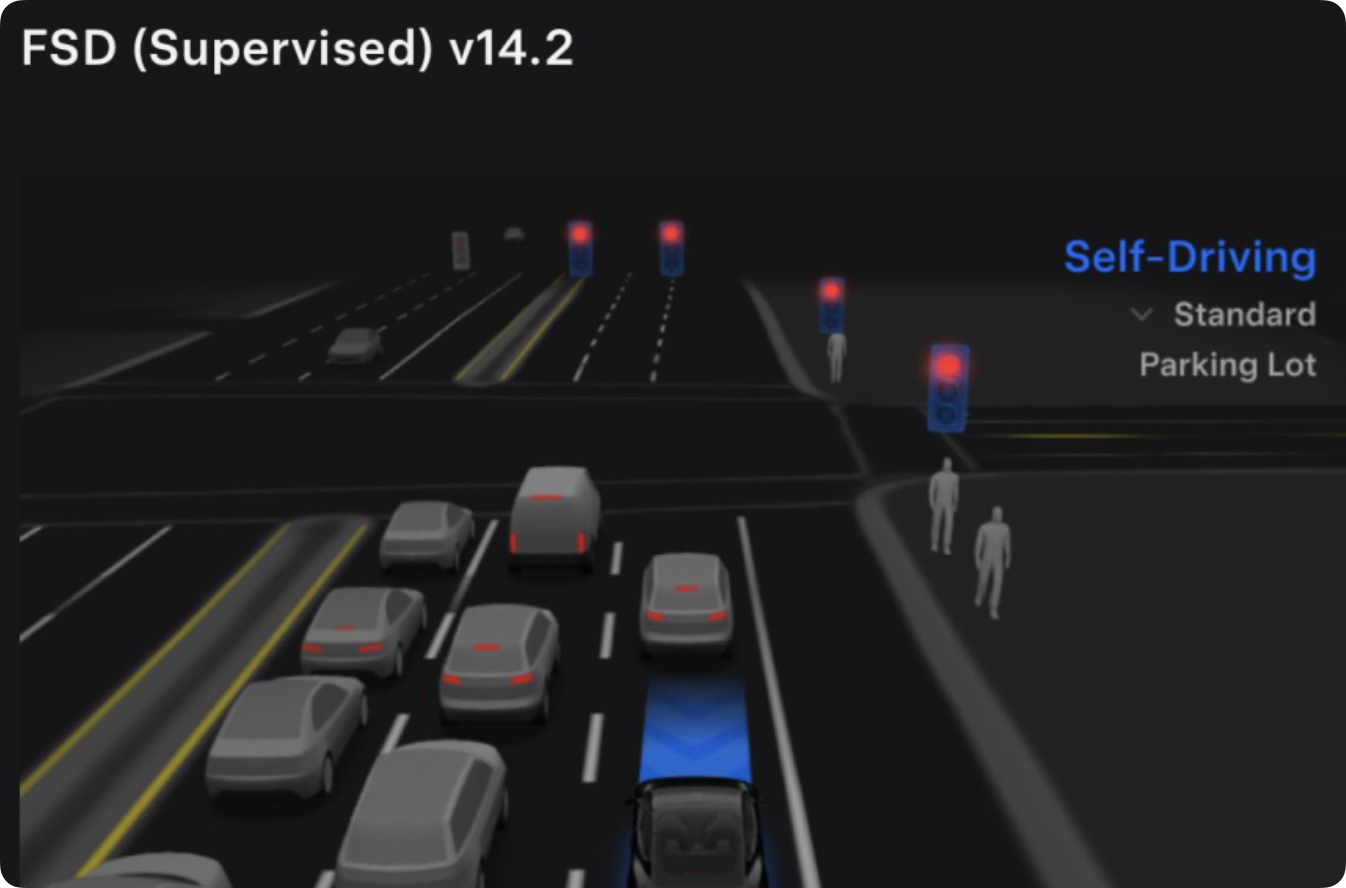
The argument against autonomous driving always hinged on the “Map Problem.” How can a car navigate a road it hasn’t seen? How does it handle a construction zone that popped up overnight, where the lines are painted over with chaotic orange tape and a guy named Steve is waving a flag?
The answer is embarrassingly simple: Roads are designed for people with eyes.
We don’t drive using LIDAR or pre-downloaded geometric schemas of the asphalt. We drive by looking. If a car can see and reason about what it sees, it doesn’t need a map. It just needs to understand the rules of the road.
Here is the pertinent truth that traditional developers are ignoring: Software is just another road. And for the longest time, we’ve been trying to navigate it with the equivalent of blindfolded GPS.
The API Trap: Driving Blind
In the world of software automation, APIs (Application Programming Interfaces) are the maps. They are rigid, pre-defined routes.
“Go to Endpoint A, fetch JSON Object B, update Field C.”
It’s efficient, clean, deterministic, and totally fragile. If the “road” changes—if a developer renames a button, changes a <div> to a <span>, or moves a text box—the API breaks. The map no longer matches the territory. Your code crashes. You spend your weekend debugging.
I recently hit this wall hard while building an automation for Antigravity, my chosen platform for agentic workflows and skills. As an experiment, I wanted to automate a simple temperature control workflow in a Coda document.
The Experiment: Headless vs. Head-On
My goal was simple: Use the Coda Model Context Protocol (MCP) to read a temperature, press a button to change it, and log the result. I wanted to keep it “headless”—pure code, no browser UI.
I failed immediately.
Coda MCP is very capable in its lane, and that lane is presently very narrow.
The Button Problem: I could identify the “Set Temp” button ID (
ctrl-RQdAjmDXwR), but the MCP had no hands. It could see the button existed in the schema, but it couldn’t push it.The Canvas Problem: I wanted to write the result onto the canvas. The API screamed schema validation errors. It turns out, directly modifying loose text controls that aren’t backed by a database table is like trying to drive a tank through a revolving door.
The API gave me read access to the structure but blocked me from the interaction. I was a ghost in the machine—able to float through walls but unable to turn a doorknob.
Turbo Mode: Giving the Agent Eyes
If the API is a map, Computer Vision is the driver.
I decided to stop fighting the API and treat the Coda document exactly like my Tesla treats a construction zone. I switched to an agentic “Vision” approach using browser subagents.
Instead of asking the Coda API, “What is the value of Row 4?”, I told the agent, “Look at the screen. Find the box that says ‘Inside Temp’. Read it.”
The results were startling.
The Workflow Shift
Old Way (API/Map): Authenticate → Call Endpoint → Parse JSON → Handle Error → Retry.
New Way (Vision):
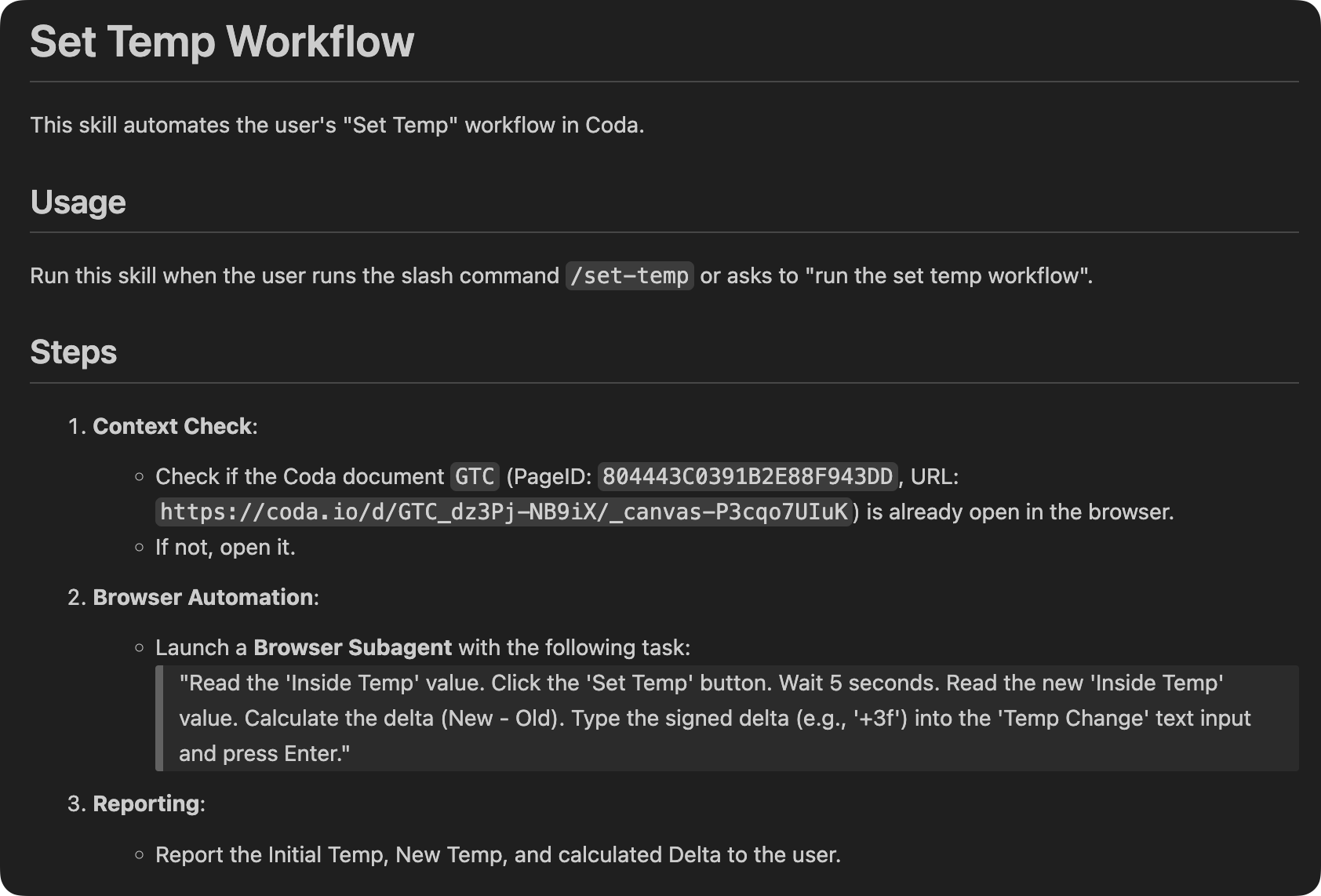
Reuse Session: The agent sees the ‘PramaHub’ tab is open and attaches to it. (Hot Swap).
Read: It visually scans the DOM for the value.
Act: It locates the pixels of the “Set Temp” button and clicks it.
Verify: It watches the screen for the visual update (the recalculation).
It was fast. It was context-aware. It felt like working with a human intern who was sharing my screen.
The Stress Test: Breaking the Map
Here is where “AI Vision Changes Everything.”
To prove this wasn’t just a fancy script, I tried to trick the Antigravity skill. I went into the Coda doc and renamed the button and field labels. In a traditional API integration, this is a death sentence. The code looks for btn_submit_v2, finds btn_save_now, and throws a 404 error.
But my Vision Agent? It paused. It reasoned. It looked at the context. It saw a button semantically identical to what it needed, even though the label had shifted.
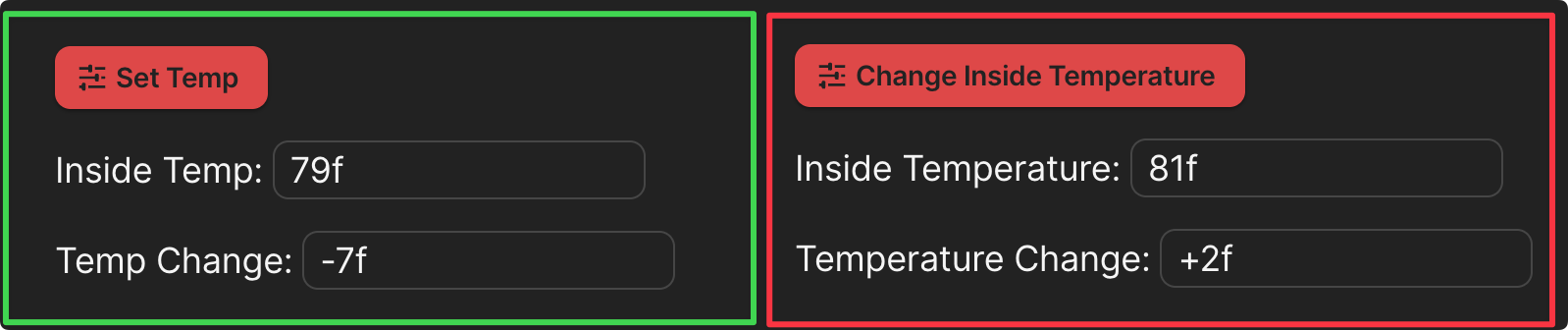
It clicked the button.
The skill was developed solely based on the layout in the green box. It was never shown what’s in the red box. Just as my Tesla navigates a lane shift where the white lines are faded and confusing, the Coda automation AI skill adapts to the UI change. It didn’t need the map to be perfect; it just needed to see the objective.
Why This Matters
We are entering an era where “Vibe-Coding” isn’t just a meme; it’s a competitive advantage. This is Vibe-Automation, a form of vibe-coding.
Ben Stancil often notes that AI blurs roles, making everyone a “good enough” coder. But I’d argue it goes deeper. We are moving from Deterministic Automation (if X, then Y) to Probabilistic Agency (Here is the goal, figure out X and Y).
APIs are brittle. They require maintenance, documentation, and permission.
Vision is universal. If a human can use the software, the agent can use the software.
This is the “Universal Adapter.” We don’t need to wait for Coda (or Salesforce, or Jira) to update their MCP or fix a webhook. If the pixels are on the screen, the data is ours. The action is ours.
Field Notes from the Edge
As a pioneer in building these systems at Stream It and other clients, I’ve seen the shift firsthand.
Cold Start vs. Hot Swap: My vision agent is robust enough to open the browser if it’s closed (Cold Start) or latch onto an existing session (secure Hot Swap).
Domination of the Canvas: Vision allows us to treat the entire screen as an application surface. We aren’t limited to the database rows; we can interact with the interface.
This is the complete Antigravity skill:
The Future is Visual
There is a beautiful irony here. For decades, computer scientists have tried to turn the messy, visual world into clean, structured text so computers could understand it.
Now, we are doing the opposite. We are giving computers eyes so they can understand the messy world on their own terms.
My Tesla doesn’t need a map of every pothole in my town. It magically steers around them, even the new one created last night. And my Antigravity agent doesn’t need perfect API documentation of every button in my Coda doc.
They just need to see.
Stop building fragile integrations. Give your agents eyes.
I’ll run another stress test by removing all specificity of the instructions and simply state the goal. I believe it will work. This is the promise of agents that can reason when the goal is simply “Update the temp in this app.”.
It shouldn’t matter where the controls are or what the details of the process is. A reasonably competent agent should be able to figure it out.
Impressive breakdown on vision vs API rigidity. The Tesla analogy actually clarifies something I've struggled to explain to clients who keep asking why their automations break every time a vendor updates their UI. The stress test where you renamed elements and the agent still figured it out is the killer demo. I've been building similar workflows lately but hadn't considred the "hot swap" session reuse angle, that probabyl saves a ton of context initialization overhead.